
How to enter the CHALLENGE
Entering the CUPOTY CHALLENGE is as easy as 1–2–3:
Pay for your entry. (Go to ENTER NOW > ENTER THE CHALLENGE)
Prepare your images for submission.
Upload your pictures to us. (Go to ENTER NOW > UPLOAD YOUR PICTURES)
A detailed guide is provided below.
Before you take part
Please read the rules.
Decide how many photographs you wish to enter. You may enter:
1 picture for £11 (£10 earlybird offer ends on 8th Nov)
3 pictures for £16 (£14 earlybird offer ends on 8th Nov)
There is no limit to the number of entries you purchase.
1. Pay for your entry
Go to ENTER NOW > ENTER THE CHALLENGE and select the number of images you'd like to enter. Fill in your details and pay by card or PayPal.
If you are paying for entry on behalf of someone else, or an under-18, you should use your own details at checkout and add the entrant's name and email in the CUPOTY Entrant Details boxes.
Once your payment is accepted, you've entered the competition. Now you need to send us your pictures.
2. Prepare your image files
Resize a copy of each image so it’s:
2200px along the longest edge (if the original file is smaller send the largest you have)
in the sRGB colour space
without watermarks, borders or signatures
with the EXIF data intact (if possible)
saved as a JPEG at maximum quality
less than 10MB
Learn how to resize images here.
Rename each image in the following order:
first name
last name
a short picture title
Separate your name and picture title with a hyphen so that it looks like this:
John-Smith-Jumping Spider
or
Lucy-Jones-Snowdrops In The Snow
Captions
Please add a caption for each image in the boxes on the UPLOAD YOUR PICTURES form. Tell us the title, where it was taken and how you made it.
Tip
To ensure your caption always stays with your image file, you can also add it in your editing software before exporting:
Lightroom Classic – Library module > Metadata > Caption
Lightroom (cloud/mobile) – Info panel ((i) icon) > Caption
Photoshop – File > File Info > Basic > Description
Affinity – open the Metadata panel from the Window menu > File > Description
Capture One – Metadata tool tab > IPTC - Content > Description
Make sure your export settings include metadata, or the caption may be removed.
3. Send your pictures to CUPOTY with our form
Go to ENTER NOW > UPLOAD YOUR PICTURES on the navigation bar at the top of the page.
The form below is what you should see. If it is not there, please refresh your browser.
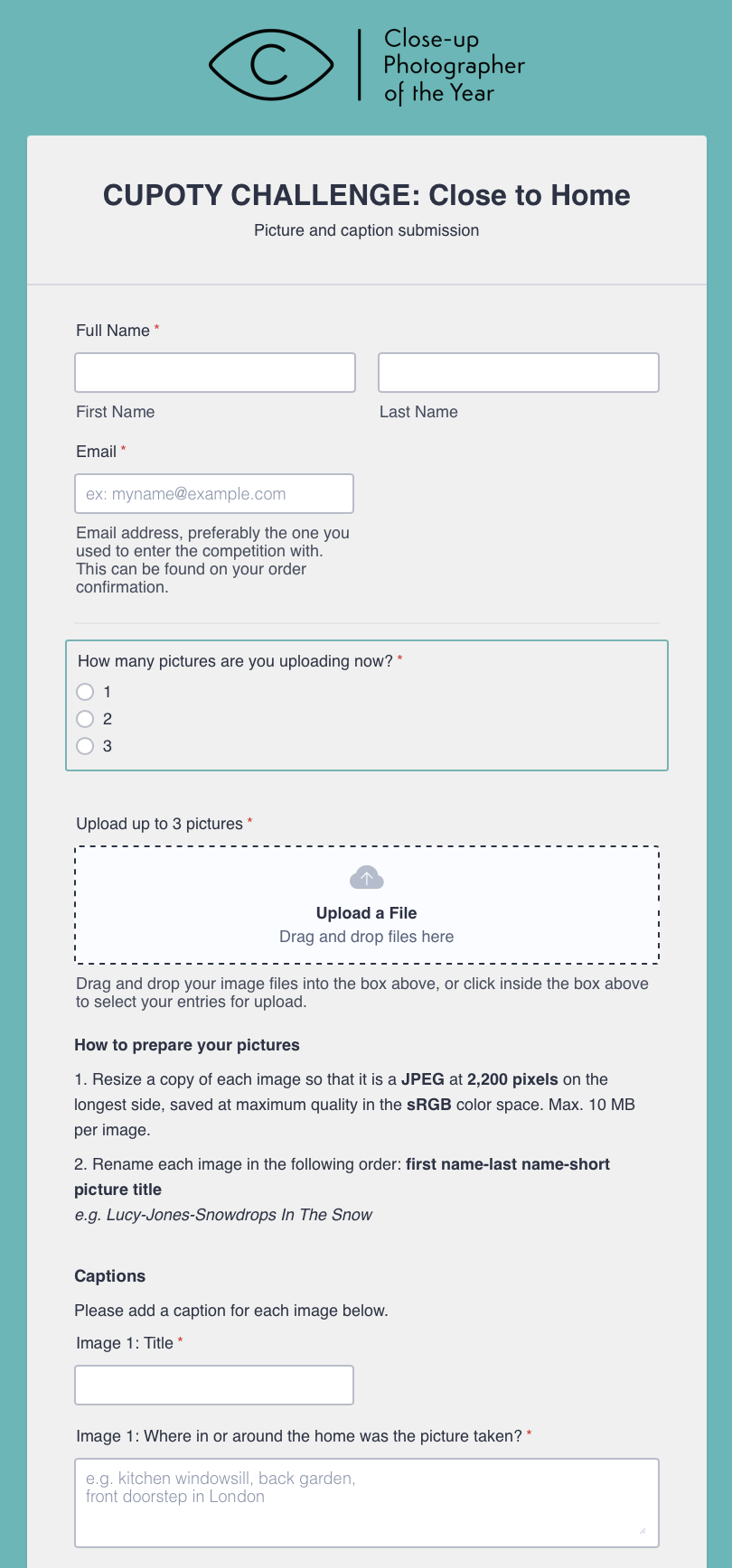
Fill in the form with your name and the same email address you used at checkout (this will be the email address that your order confirmation was sent to.)
Select how many pictures you are sending with this form.
Upload all your picture files at once by dragging and dropping your files into the ‘Upload a File’ box, or click inside the box to select your entries for upload.
Add a caption for each picture in the boxes towards the bottom of the form.
Click Submit and you’re in. An email will be sent to you confirming the receipt of your pictures with a record of your submission.
Note
If you can’t use the form, please send your pictures through our WeTransfer page at https://cupoty.wetransfer.com
If you can’t use WeTransfer either, please email us at enter@cupoty.com and we’ll arrange another way for you to send your pictures.
Shortlisted photos
If any of your photos make the shortlist we may request:
a full sized, full resolution JPEG of your entry in the sRGB color space;
detailed information about you and the picture for use on our winners gallery;
the original unedited image file.
Having trouble?
Check out the FAQ.
If you're stuck, need some advice or have any kind of problem email us at hello@cupoty.com.