
How To Enter
Entering CUPOTY 8 is as easy as 1-2-3:
Pay for your entry. (Go to ENTER NOW > ENTER CUPOTY)
Prepare your images for submission.
Send your images to us. (Go to ENTER NOW > SEND IMAGES)
A detailed guide is provided below.
Before you take part
Please read the rules.
Decide how many photographs you wish to enter. You may enter:
Up to 6 pictures — £22 (£20 earlybird)
Up to 15 pictures — £33 (£30 earlybird)
Up to 30 pictures — £44 (£40 earlybird)
Young CUPOTY (entrants aged 17 or under on the closing date): £5 for up to 15 pictures.
Your entries can be spread across as many categories as you like. The same image can be entered into more than one category, but each entry counts towards your total.
1. Pay for your entry
Go to ENTER NOW > ENTER CUPOTY and select the number of images you'd like to enter. Fill in your details and pay by card or PayPal.
If you are paying for entry on behalf of someone else, or an under-18, you should use your own details at checkout and add the entrant's name in the Additional Information box.
Once your payment is accepted, you've entered the competition. Now you need to send us your pictures.
2. Prepare your image files
Resize a copy of each image so it’s:
2200px along the longest edge (if the original file is smaller send the largest you have)
in the sRGB colour space
without watermarks, borders or signatures
with the EXIF data intact (if possible)
saved as a JPEG at maximum quality
Learn how to resize images here.
Add a caption in your image editing software if possible. A good caption covers what the subject is, where and when it was taken, and how it was made (including any post-processing or focus stacking).
Please don't include your name in the caption.
You can add a caption in your image editing software like this:
Lightroom Classic – Library module > Metadata > Caption
Lightroom (cloud/mobile) – Info panel ((i) icon) > Caption
Photoshop – File > File Info > Description
Affinity Photo 2 – Window > Studio > Metadata > IPTC (Image) > Description
Capture One – Metadata tool tab > IPTC - Content > Description
Rename each file in this order, separated by hyphens:
category-first name-last name-short title
Use a short version of the category name: animals, insects, butterflies, portrait, arachnids, underwater, plants, fungi, landscape, studio or young. For example:
animals-John-Smith-jumping spider.jpg
plants-Lucy-Jones-snowdrops in the snow.jpg
3. Send your images
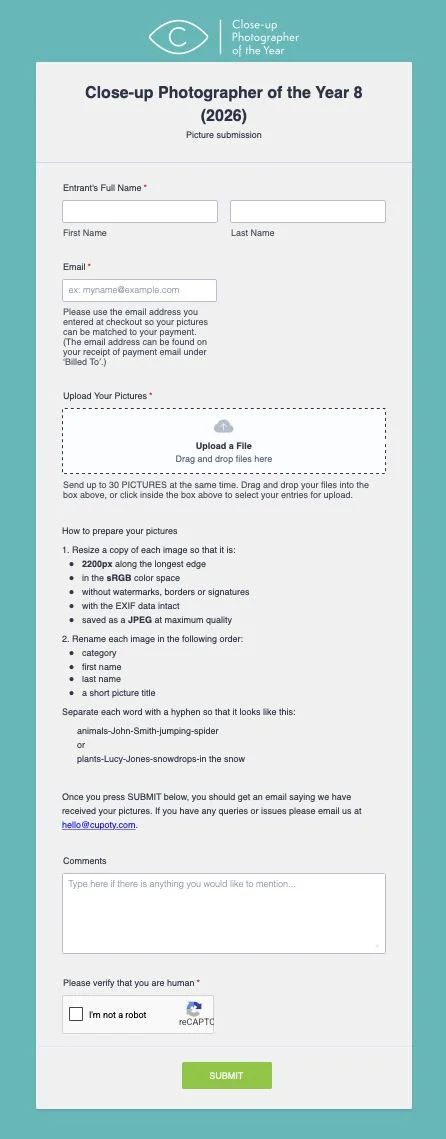
Go to ENTER NOW > SEND IMAGES and use the upload form (see below).
Use the same email address you entered with as that's how we link your files to your entry.
Drop all your images into the ‘Upload a File’ box at once, add any comments, tick the reCAPTCHA, and submit.
You'll get an on-screen confirmation and an email receipt.
You can send images at any time from the moment you pay until seven days after the closing date.
What happens next
After the closing date, we’ll check every entry is in the correct category before the Jury reviews the entries anonymously. If you're shortlisted, we'll email you and ask for a high-resolution file, your original Raw file (or untouched JPEG, or focus-stack source files for stacked images), and some background information about your picture. See the FAQ for more detail.
Need help?
If the upload form isn't working, or you have any other problem, email us at enter@cupoty.com.
For general questions, the FAQ covers most things.